A tweet screenshot post is an Instagram or TikTok post that shows a short text in the style of a post on X: a round profile picture, a name, a @handle, two or three lines of text and sometimes the likes and reposts underneath, placed on a vertical 9:16 image or a feed image. It works because it reads like a personal opinion rather than an ad, it takes two seconds to consume, and a sharp take is exactly the kind of thing people save or send to a friend.
For a brand, the right way to use it is simple: your own words, under your own name and handle, without the X logo. This guide explains why the format performs, how to write a take that people share, the design choices (light or black, full screen or card, with or without a photo), ideas for different businesses, and the rules that keep you out of trouble.
Why do tweet screenshot posts work on Instagram and TikTok?
The format borrows the visual grammar of a social post that everyone already knows. Viewers do not need to learn how to read it: avatar, name, text, done. That familiarity is what makes it so fast, and on short-form feeds speed is what keeps a thumb from scrolling.

It reads like a native opinion
A polished graphic with a logo signals "advertising" before the viewer reads a word. A tweet-style post signals "someone said this". The face and the handle at the top give the text a voice, which is why the format suits founders, experts and brands with a strong point of view. People react to an opinion; they ignore a slogan.
It is fast to consume
One image, one idea, read in the time it takes to scroll. On TikTok and Reels, where a video has to earn every second, a tweet post shown for a few seconds (or with a short clip inside it) asks very little of the viewer. There is no setup, no intro, no "wait for it".
It is made to be saved and shared
A good take is quotable. People screenshot it, send it to a colleague who "needs to see this", or save it as a reminder. Those actions are what short-form ranking systems pay attention to, and they put your post in front of people who do not follow you yet. The same logic is behind meme marketing for brands: a format built to be passed on travels further than one built to be admired.
- Familiar layout
- Read in seconds
- Feels like an opinion
- Easy to save and send
- Cheap to produce
There is also a production argument. Once your template is set, a new post is a new sentence. You can publish several a week without filming, which makes the format a natural partner to the videos and carousels that take more time.
How do you write the text of a tweet post?
The template is the easy part. What makes a tweet post work is the sentence. Most of the ones that get shared follow the same rules: one idea, said plainly, short enough to read at a glance.
- Pick one strong takeAn opinion, a lesson learned, a counter-intuitive truth about your field, a confession. "Most landing pages explain the product. The good ones explain the problem." If you cannot say it in one breath, it is two posts.
- Keep it shortX itself caps standard posts at 280 characters, and that is a good ceiling for an image too. One to three short lines read best on a phone. Cut every word that does not change the meaning.
- Front-load the pointThe first five words decide whether people keep reading, exactly like a video hook. Our list of TikTok hook examples works just as well for the first line of a tweet post.
- Write like you talkNo hashtags inside the image, no corporate phrasing, no exclamation marks to compensate for a weak idea. Line breaks are your friends: a pause before the punchline reads well.
- Put the rest in the captionThe image carries the take. The caption can add context, a question to start the comments, or a link in bio. That way the image stays clean.
A few structures that reliably produce good takes: "Unpopular opinion: …", "Things I wish I knew before …", "X is not the problem. Y is.", "Nobody talks about …", a short list of three items, or a before/after in two lines. Use them as starting points, not as fill-in-the-blank formulas.
How should a tweet template for Instagram look?
Design choices are few, which is part of the appeal. But they matter, because a tweet post that is hard to read on a small screen is skipped. Here are the main options.
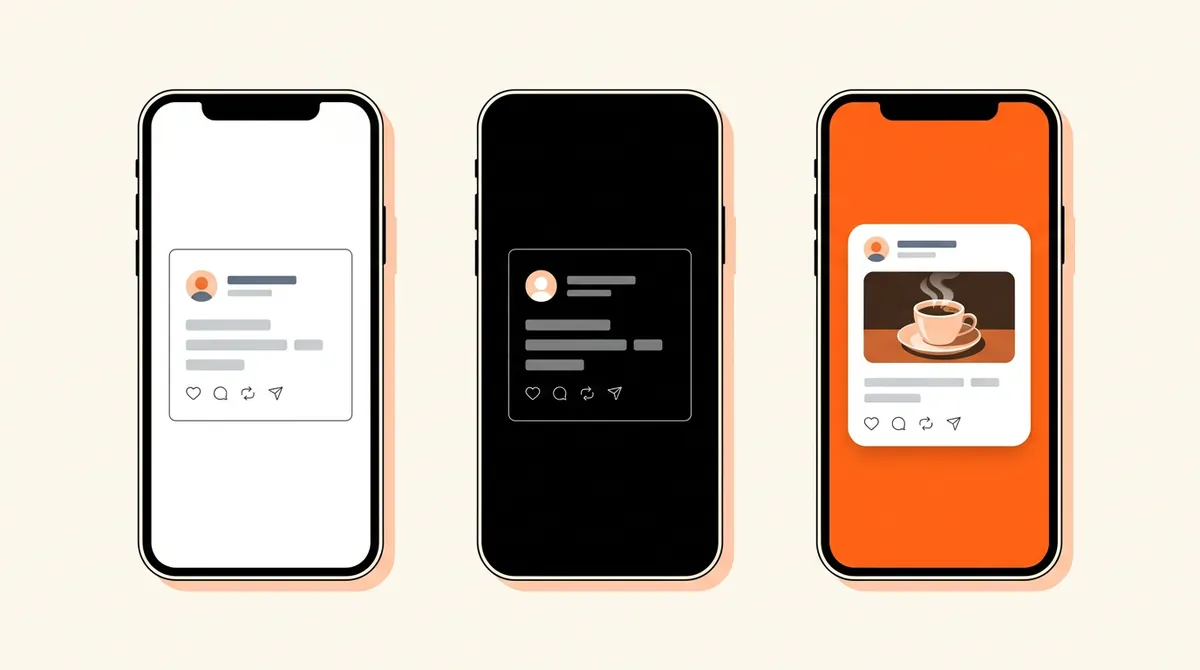
| Choice | Options | When to use it |
|---|---|---|
| Theme | Light (white), dim (dark blue) or black | Black stands out in a bright feed and looks clean full screen; light feels softer and closer to a printed quote |
| Layout | Full screen (the post colour fills the image) or card (the post floats on another background) | Full screen for pure text; a card on your brand colour to make the series recognizable |
| Format | 9:16 vertical, 4:5 or 1:1 feed image | 9:16 for TikTok, Reels and Shorts; 4:5 for the Instagram feed and grid |
| Media | Text only, or a photo or short video inside the post | Add media when it proves the point: a product shot, a result, a behind-the-scenes clip |
| Stats | Time, views, replies, reposts, likes, bookmarks, or nothing | Optional decoration; never display numbers that suggest a popularity the post did not have |
Keep it legible
On a 9:16 image, a tiny card in the middle of a huge empty background looks like an accident. Make the text big enough to read without zooming (it should take a good part of the screen width), keep generous margins so nothing hides under the platform's buttons and captions at the bottom and right, and keep strong contrast between text and post colour. Test on your own phone before publishing.
Add a photo or a video inside
A text-only tweet post is perfect for an opinion. When the take refers to something visual (a before/after, a new product, a messy desk at 2 a.m.), putting the photo or a short clip inside the post, under the text, gives the eye a second reason to stop. On TikTok and Reels, a moving clip inside a still post often holds attention better than a static image. Crop the media to a frame that fits (16:9, 1:1 or 4:5 usually leaves room for the text).
Make it yours
Use your real profile picture (your face or your brand mark), your real name and your real handle. Keep the same colours from one post to the next so a follower recognizes the series before reading it. Consistency is what turns a one-off post into a format people look forward to.
What can you post? Tweet post ideas by business type
The format adapts to almost any account, as long as the text says something your audience recognizes. A few starting points:
Notice that none of these ideas mentions a price or a discount. The tweet post earns attention with the take; the profile and the caption do the selling.
What are the rules for tweet screenshot posts?
The format is a style, and a style is free to use. What is not free is someone else's identity, someone else's words or someone else's logo. Three rules cover almost everything. This is general information, not legal advice.
How do you make a tweet screenshot post?
You do not need to post on X first and take a screenshot. That produces a blurry image with the wrong proportions, and the logo of a platform you are not publishing on. It is simpler to design the post directly at the right size.
- Write the takeOne idea, one to three lines, under 280 characters.
- Set the profileYour profile picture, your name, your handle. A verification badge only if your account really has one.
- Choose the lookLight or black, full screen or a card on your brand colour, text size large enough to read on a phone.
- Add media if it helpsA photo or a short clip inside the post, cropped to a frame that leaves room for the text.
- Export in 9:16 and publishA 1080 × 1920 image (or a video if the media moves) for TikTok, Reels and Shorts, with the rest of the message in the caption.
A design tool with a template does the job for a few posts. If you want tweet posts to be a regular part of your mix, Bloomr's tweet post generator has a dedicated Tweet format. In its editor you pick the profile picture from your library, then set the name, the handle and the verification badge (none, blue or gold), the text, and optionally an image or video from your library, with a frame (16:9, 1:1, 4:5 or 9:16), a width, a zoom and a drag to choose the part shown. You can fill in the time and date, views, replies, reposts, likes and bookmarks, choose the post colour (black by default) and the background, and adjust the text size. The result is a 9:16 image, with the video playing inside it when the media is a video, that you publish or schedule to TikTok, Instagram and YouTube Shorts. No X logo is drawn. The take still has to come from you, which is the part that matters.