Tweet post generator
Your words, styled like a tweet: the tweet post generator for Instagram and TikTok
Write the post, set your name, handle, profile picture and stats, add an image or a video if you like, and Bloomr draws the tweet screenshot as a 9:16 image. It saves as you type, downloads in one click and publishes to Instagram, TikTok and YouTube Shorts.
Open on invitation · Your text, your brand · Saved automatically
- TikTok
- YouTube
Key takeaways
- A tweet template for Instagram and TikTok: the screenshot of a post, drawn in 9:16 from what you type, ready for vertical feeds.
- Every detail is yours: profile picture, name, handle, badge, text, time and date, views, replies, reposts, likes and bookmarks.
- Media inside the tweet: an image or a video from your library, framed in its original shape, 16:9, 1:1, 4:5 or 9:16, then zoomed and dragged to crop.
- Your look: a black post by default, any post color, and a background that fills the screen or sets the tweet apart as a card.
- Written by you: the AI does not write the tweet, only the caption of the post. No X logo is drawn, and it is made for your own words.
Definition
What is a tweet post generator?
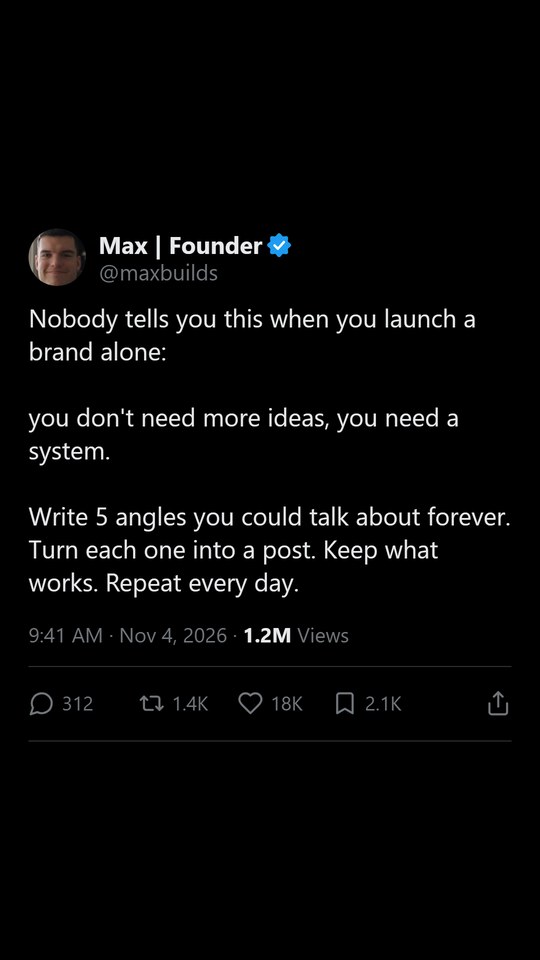
A tweet post generator is a tool that lays a short text out like a post on X, with a profile picture, a name, a handle and the counts underneath, and exports it as an image for other networks. Tweet screenshots work on Instagram and TikTok because they read in a second: one opinion, one line, a familiar frame.
In Bloomr, the Tweet format is an editor rather than a text generator. You write the post and set every element yourself, and the canvas redraws the 9:16 image with each change. Nothing in the content is generated: the AI only writes the caption of the post, from the tweet's text, when you publish.
It is built for brands posting their own words under their own name. Use your brand's or your founder's profile, never someone else's account, and keep the stats honest: the format borrows the look of a tweet, not anyone's identity.
What you get
Everything in the tweet, in your hands
A full editor for the post, with a live 9:16 preview that saves by itself.
Profile and badge
A profile picture from your library, a name and a handle, with no badge, a blue badge or a gold organization badge.
The text
Type it as you would on X, with a 280-character counter. The size is adjustable and shrinks by itself when the tweet does not fit.
An image or a video
Pick a media from your library and choose its frame: original, 16:9, 1:1, 4:5 or 9:16. Set the width, zoom and drag to crop.
Date and stats
Time and date, views, replies, reposts, likes and bookmarks, with an optional filled heart. Show the stats or hide them.
Colors
Black by default, or any post color, with the text turning light or dark to stay readable. The background fills the screen or frames the tweet as a card.
Download or publish
Download the image, or publish it to Instagram, TikTok and YouTube Shorts. With a video inside, it plays in the tweet and the post's music runs under it.
How it works
From a sentence to a tweet post in three steps
No design tool, no screenshot to fake by hand.
- 01
Set the profile
Choose the profile picture, name, handle and badge your brand posts under.
- 02
Write the tweet
Type the text, add an image or a video if it helps, and set the date, the stats and the colors.
- 03
Publish it
The 9:16 image saves by itself. Download it, or post it to Instagram, TikTok and YouTube Shorts with a caption written by the AI.
Compared
Bloomr compared with a design tool template
The same tweet look, without rebuilding it for every post.
| With Bloomr | A generic design tool | |
|---|---|---|
| Layout | Drawn for you from the fields you fill | A template to adjust element by element |
| Long or short text | Shrinks by itself to fit the image | Resized by hand each time |
| Media inside | Image or video, framed and cropped in the editor | Images placed by hand; video often not possible |
| Saving | Automatic, with every change | Export after each edit |
| Publishing | Instagram, TikTok and YouTube Shorts from the same place | Downloaded, then uploaded app by app |
| The words | Yours: nothing is written for you but the caption | Yours |
Who it is for
Who posts tweet-style content
Anyone with something to say in one line and a brand to say it under.
- Founders sharing lessons
- Coaches and consultants
- SaaS and app teams
- Newsletters and writers
- Podcasts sharing quotes
- Personal brands
- Agencies running several brands
- Communities and media pages
Formats
Everything Bloomr makes
Make each post in the format that suits the idea, or let Auto Gen draft them in the mix you choose for your brand.
- AI shorts generatorEvery short-form format, generated from your brand and posted to TikTok, Instagram and YouTube.See the page →
- Content autopilotAuto Gen drafts posts from your content angles; you keep the good ones and they go out on schedule.See the page →
- AI carousel generatorInstagram and TikTok carousels with a hook on slide one, written, illustrated and posted for you.See the page →
- Wall of text video generatorA long, punchy text over a face-to-camera video, written and posted for you.See the page →
- Green screen meme generatorYour hook, a background and a well-known green screen meme picked to land the joke.See the page →
- AI TikTok video generatorScenes filmed by a video model from a description, edited into a TikTok and posted from the same place.See the page →
- Product demo video makerA hook that stops the scroll, then your product in action: demo videos for apps, SaaS and physical products.See the page →
- AI UGC video generatorFace-to-camera UGC videos with recurring AI influencers or a ready catalog, turned into posts for TikTok, Instagram and YouTube.See the page →
Say it in one line, post it everywhere
Join the waitlist: we will set up your first brand with you as soon as your access is ready.
- A tweet editor in 9:16
- Images and videos inside
- Instagram, TikTok and YouTube
Frequently asked questions
How do I make a tweet screenshot for Instagram?
In Bloomr, open the Tweet format, fill in the profile, the text and the stats, and the editor draws the screenshot as a 9:16 image. Download it, or publish it to Instagram directly, with the caption written for you.
Does the AI write the tweet?
No. You write the tweet and set every detail. The only thing the AI writes is the caption of the post, from the tweet's text, when you publish.
Can I add an image or a video to the tweet?
Yes. Pick an image or a video from your library and choose its frame (original, 16:9, 1:1, 4:5 or 9:16), its width and zoom, and drag it to choose the part shown. A video plays inside the tweet, without its own sound, and the post lasts as long as the video.
Is it a fake tweet generator?
It is made for posting your own words under your own brand, in the familiar look of a tweet. Use your own profile, never another real account, and do not present it as a post that was published on X if it was not. No X logo is drawn on the image.
Which sizes and colors are available?
The image is always 9:16, for Reels, TikTok and Shorts. The post is black by default and can take any color, and the background either matches it for a full-screen look or uses another color to show the tweet as a card.
Where can I publish it?
Bloomr publishes it to Instagram, TikTok and YouTube Shorts, now or on a scheduled date. You can also download the image for every other network.
How do I get access?
Bloomr is open on invitation for now. Join the waitlist and we will write to you as soon as your access is ready.